Home / Product Setup & Usage / Configuration
Microsoft Graph API (TMC v3.2 only)
Important!
- The below information applies to Transend Migration Console v3.2 only.
- If you are using Transend Migration Console v3.3 or later, view the current Graph considerations.
- Recommended! When migrating to Microsoft 365 using the Graph API, we strongly recommend using the latest build of Transend Migration Console (v3.3 or later) to take advantage of the latest enhancements and expanded Graph API support.
Microsoft began phasing out Exchange Web Services (EWS) in Exchange Online in October 2026, with EWS scheduled to be fully disabled by April 2027. As a result, Microsoft Graph will become the primary API for migrating mailbox data to and from Microsoft 365.
To support this transition, Transend Migration Console 3.2 includes support for Microsoft Graph as an optional API selection, currently labeled (Preview).
Microsoft Graph support is fully functional; however, certain limitations inherent to the Graph API require additional consideration during migration. The most significant known limitation involves calendar data. When Graph is used as the migration target, Microsoft 365 may automatically generate and send meeting invitations and updates to calendar attendees as events are migrated.
To prevent these unwanted calendar notifications (commonly referred to as a “calendar invite storm”) Transend provides two options.
Reminder: These options are only appropriate when Graph is the target.
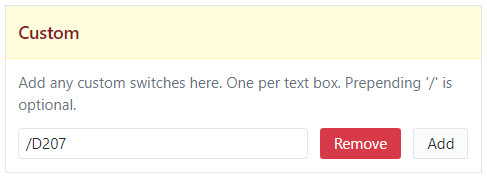
Option 1 (recommended) – Enable the /D207 Custom option in Transend Migration Console. When Microsoft Graph is used as the target, this option removes attendees from the organizer’s calendar event header during migration and adds the attendee information to the event body in the target event. This prevents Microsoft 365 from generating and sending unintended calendar notifications during migration.
If the migrating user is an attendee rather than the event organizer, the event is skipped.
After migration, it is recommended that the organizer re-add attendees to the event header, as appropriate, allowing Microsoft 365 to send native calendar invitations.
Note: The /D207 option applies only when Microsoft Graph is used as the target API.
To enable the /D207 Custom option:
Navigate to the Settings screen.
In the Mailbox Options tab, check the Show hidden options checkbox.
Locate the Custom section in the bottom-right corner of the screen.
Enter /D207 into the Custom field.
Click Continue in the top-right corner of the screen to apply the setting.


Option 2 – If you do not want to enable the /D207 Custom option, enable Exchange Online Transport Rules (mail flow) before beginning the migration. To prevent a large volume of unintended calendar notifications during migration, implementing temporary Transport Rules within the Microsoft 365 tenant will suppress these messages for the duration of the migration process.
For assistance configuring the appropriate Transport Rules, please follow the defined steps to enable Transport Rules in Microsoft 365:
Reminder!
- The above information applies to Transend Migration Console v3.2.
- If you are using Transend Migration Console v3.3 or later, view the current Graph considerations.
 Microsoft OneDrive