Home / Product Setup & Usage / Configuration
Mail Rules
Transend Migration Console supports the migration of select Mail Rules between select source and target platforms. Only mail rules that are supported by both the source and target platforms can be migrated.
Important:
-
When migrating to Microsoft 365 or Exchange from a source platform with Mail Rules support (as defined below), the migration of Mail Rules is enabled by default and no adjustments to the Option entry is required. To disable the migration of mail rules to Microsoft 365 or Exchange, deselect the Include mail rules box in the target option settings.
-
When migrating to Google Workspace, you must follow the below steps to enable the /MAILRULES Custom Option. Without enabling the Custom Option (as defined below) no mail rules will migrate.
To enable the migration of supported Mail Rules to Google Workspace, follow these steps:
- On the Configuration Settings > Optional screen, select the Advanced Options tab at the top.
- Check the “I know what I’m doing! Edit Advanced Options” checkbox.
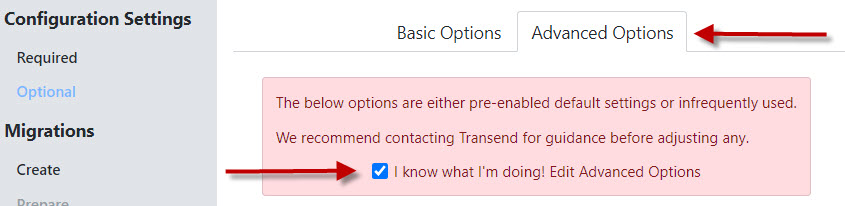
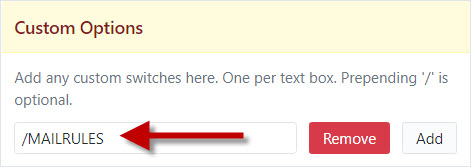
- Scroll down to the bottom right of the screen to Custom Options.
- Enter /MAILRULES into the Custom Options field.
- Click Continue at the top right of the screen.
- Supported Mail Rules that are enabled in a source mailbox will now migrate to the target mailbox.
Supported Platforms
Transend Migration Console supports the migration of Mail Rules between the below source/target platforms.
- Support is limited to native APIs
- IMAP is not supported with any platform
Source Platforms:
- Microsoft 365
- Microsoft Exchange (EWS)
- Google Workspace
- GroupWise (Web Services)
- HCL Notes Domino
- Zimbra
Target Platforms:
- Microsoft 365 (Enabled by Default)
- Microsoft Exchange (EWS) (Enabled by Default)
- Google Workspace
- Zimbra
Supported Mail Rules
The below actions and filters are supported by each respective platform. There may be additional undocumented limitations, so we recommend thorough testing to confirm support.
Microsoft 365 & Exchange (Exchange Web Services)
- Filters: Subject, Sender, To, Importance, Message Body, Size (greater or less than)
- Actions: Move to Folder, Copy to Folder, Delete, Forward, Mark Importance High, Mark as Read
- Limitations: Microsoft 365 only supports mail rules that include the AND condition with positive logic. The OR condition and negative logic (“does not contain”) are not supported by Microsoft 365.
Google Workspace
- Filters: Subject, Sender, To, Message Body, Size (greater or less than)
- Actions: Move to Folder, Delete, Forward, Mark Importance High, Mark as Read
GroupWise (Web Services)
- Filters: Subject, Sender, To, Message Body, Priority, Size (greater or less than)
- Actions: Move to Folder, Delete, Forward, Mark as Read
HCL Notes Domino
- Filters: Subject, Sender, To, Importance, Message Body, Size (greater or less than), Importance
- Actions: Move to Folder, Copy to Folder, Delete, Forward, Mark Importance
Zimbra
- Filters: Subject, Sender, To, Importance, Message Body, Size (greater or less than)
- Actions: Move to Folder, Copy to Folder, Delete, Forward, Mark as Read