Home / Platform Considerations
64-bit Notes Client
If you are migrating from/to Notes Domino or NSF files, it is recommended you have a 32-bit Notes client installed on the migration machine. If you only have a 64-bit Notes Client installed on the migration machine, follow the below steps:
Enable migration support with a 64-bit Notes client:
-
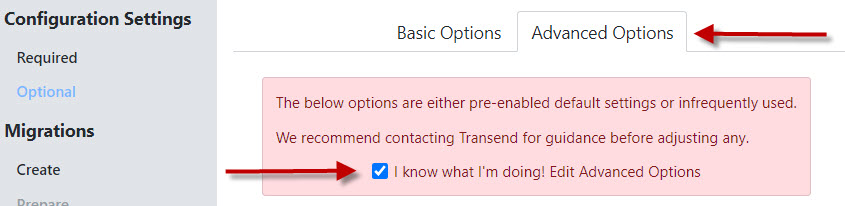
On the Configuration Settings > Optional screen, select the Advanced Options tab at the top.
-
Check the “I know what I’m doing! Edit Advanced Options” checkbox.
-
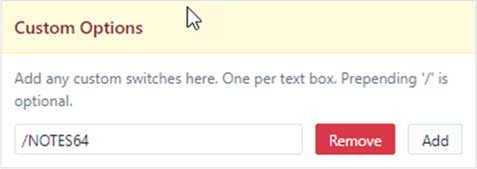
Scroll down to the bottom right of the screen to Custom Options.
-
Enter /NOTES64 into the Custom Options field.
-
Click Continue at the top right of the screen.
You have now enabled support with a 64-bit Notes Client.
64-bit Notes client detection notices
If a 64-bit Notes client is detected but /NOTES64 has not been enabled as described above, the following Error message will display in the migration log file:
- TM Error: Transend requires that the 32 bit Notes client be installed, unless /NOTES64 is enabled in Custom Options
If /NOTES64 is enabled as described above, and a 64-bit Notes client is detected during migration, the following Warning message will display in the migration log file:
- TM Warning: for optimal performance, Transend recommends using the Notes 32 bit client for this application
If /NOTES64 is enabled as described above, but a 64-bit Notes client is not detected, the following Warning message will display in the migration log file:
- TM Warning: no 64 bit Notes client is detected, using 32 bit instead
 Microsoft OneDrive