Home / Platform Considerations
64-bit Notes Client
If you are migrating from/to Notes Domino or NSF files, it is recommended you have a 32-bit Notes client installed on the migration machine. If you only have a 64-bit Notes Client installed on the migration machine, follow the below steps:
Enable migration support with a 64-bit Notes client:
On the Configuration Settings > Optional screen, select the Advanced Options tab at the top.
Check the “I know what I’m doing! Edit Advanced Options” checkbox.
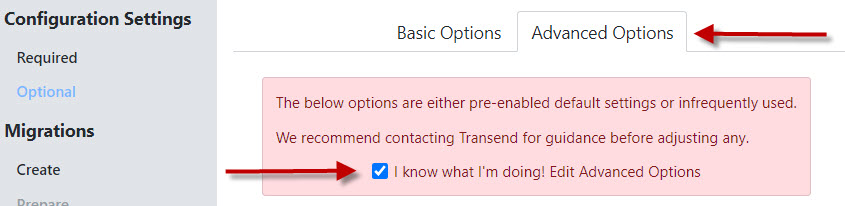

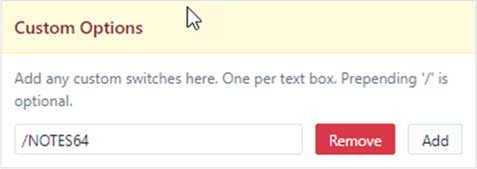
Scroll down to the bottom right of the screen to Custom Options.
Enter /NOTES64 into the Custom Options field.
Click Continue at the top right of the screen.
You have now enabled support with a 64-bit Notes Client.
64-bit Notes client detection notices
If a 64-bit Notes client is detected but /NOTES64 has not been enabled as described above, the following Error message will display in the migration log file:
- TM Error: Transend requires that the 32 bit Notes client be installed, unless /NOTES64 is enabled in Custom Options
If /NOTES64 is enabled as described above, and a 64-bit Notes client is detected during migration, the following Warning message will display in the migration log file:
- TM Warning: for optimal performance, Transend recommends using the Notes 32 bit client for this application
If /NOTES64 is enabled as described above, but a 64-bit Notes client is not detected, the following Warning message will display in the migration log file:
- TM Warning: no 64 bit Notes client is detected, using 32 bit instead
 Microsoft OneDrive