Home / Product Setup & Usage / Installation
Installation of Transend Remote Agent
To install Transend Remote Agent, click Scale > Remote Agent from the Transend Migration Console interface. This will direct you to a webpage that contains installation directions and a download link.
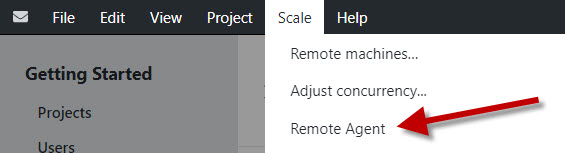
- Double-click and run the install file.
- Select Save File.
- Click the downloads folder in your directory and select Transend Remote Agent.exe.
- Read the installation notice and click Install.
- Once installation has completed, click Finish.
Important
Transend Remote Agent(s) should only be installed on remote machines that have been configured (for scalability purposes) to act as additional migration machines working in concert with the Console machine.
Ensure you are running the same version of the Console and Remote Agent, otherwise errors could occur.
If performing your migration on a single machine, installation of Transend Remote Agent is not required. The Transend Migration Console installer includes its own Local Agent.
 Microsoft OneDrive